Understanding Git, GitHub & Version Control System
21ˢᵗ Oct 2024
Introduction
Version control is an essential aspect of modern software development. Git, created by Linus Torvalds in 2005, has become the most widely used distributed version control system. GitHub, a web-based platform built around Git, has further revolutionized collaborative coding. This guide will help you understand Git, GitHub, and how they work together to streamline your development process.
History of Version Control Systems
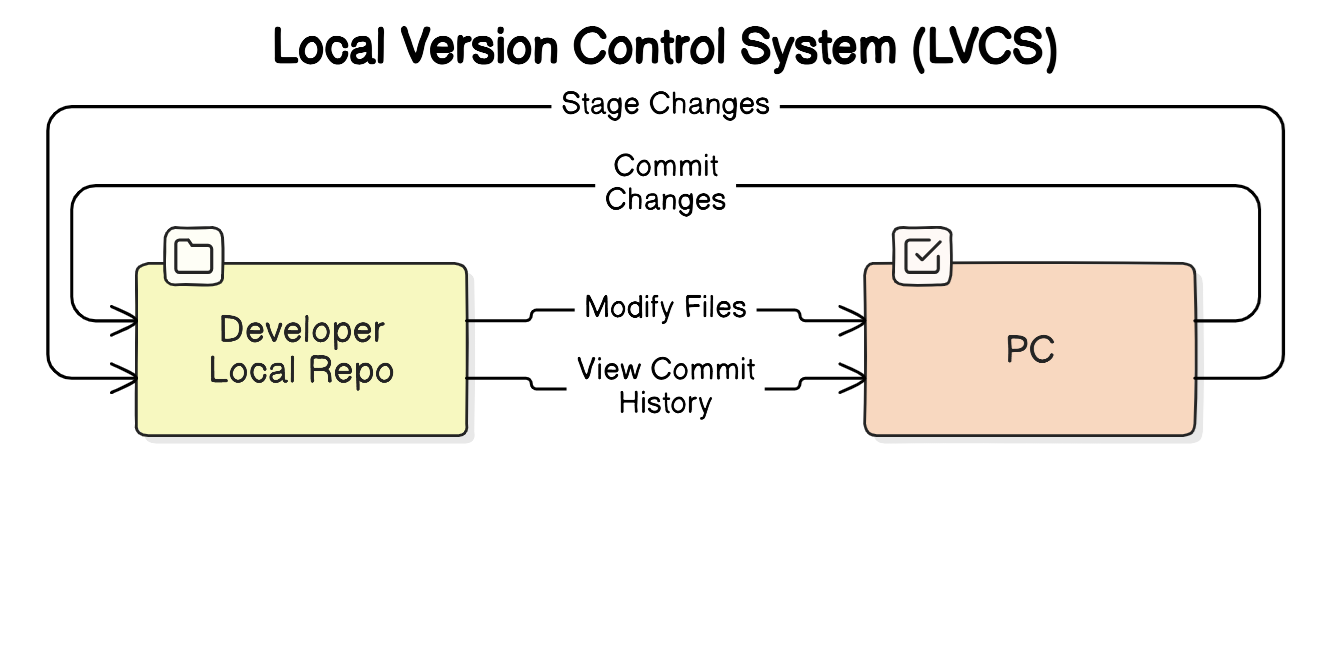
1. Local Version Control Systems (LVCS)
- Early developers managed code using local version control systems like RCS (Revision Control System).
- Key facts:
- Software used: RCS (1982), created by Walter F. Tichy
- Purpose: Track changes locally, mainly useful for individual users
- Limitation: Code was confined to one machine, making collaboration difficult.
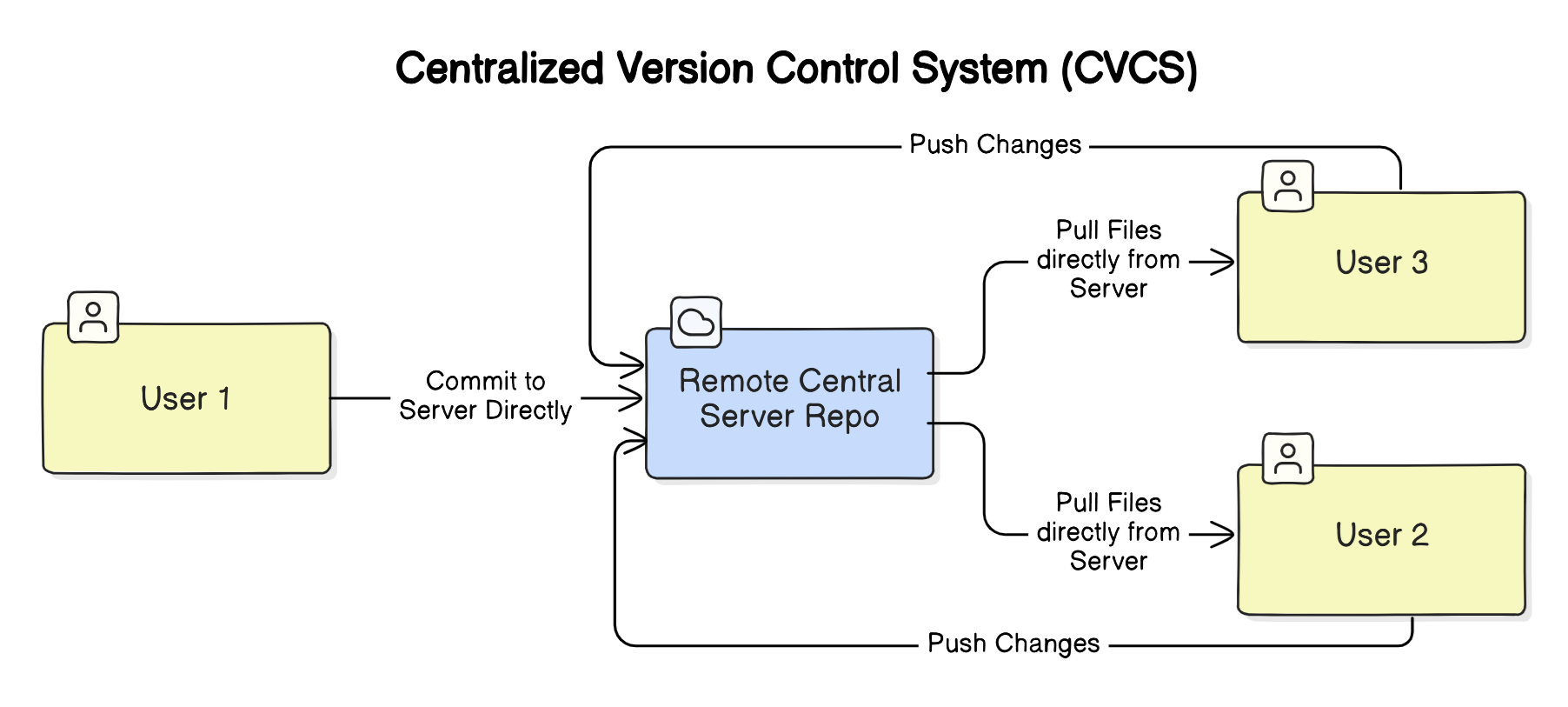
2. Centralized Version Control Systems (CVCS)
- Centralized systems were introduced to allow multiple developers to collaborate.
- Key facts:
- Software used: CVS (1986, Concurrent Versions System) and SVN (2000, Subversion)
- Purpose: Store code on a central server with team access
- Limitation: Dependency on a central server; if the server goes down, no one can commit changes.
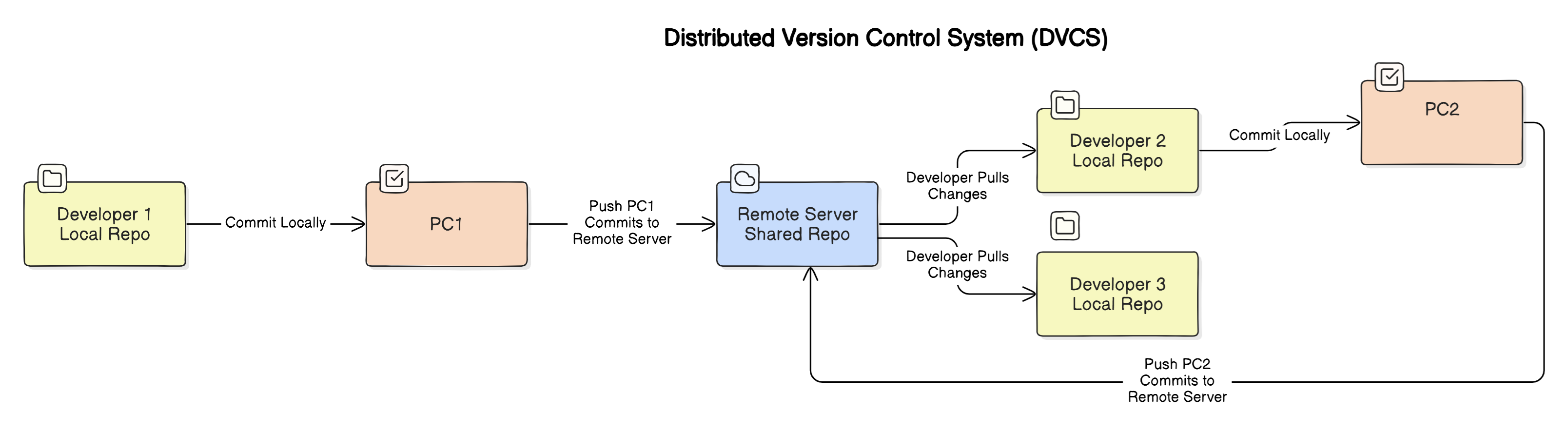
3. Distributed Version Control Systems (DVCS)
- DVCS allows each user to have a full copy of the repository, making it more efficient and reliable.
- Key facts:
- Software used: Git (2005, by Linus Torvalds)
- Purpose: Decentralized system where every developer has a full copy of the project, allowing offline work and better collaboration.
- Strengths: Branching, merging, and conflict resolution became easier.
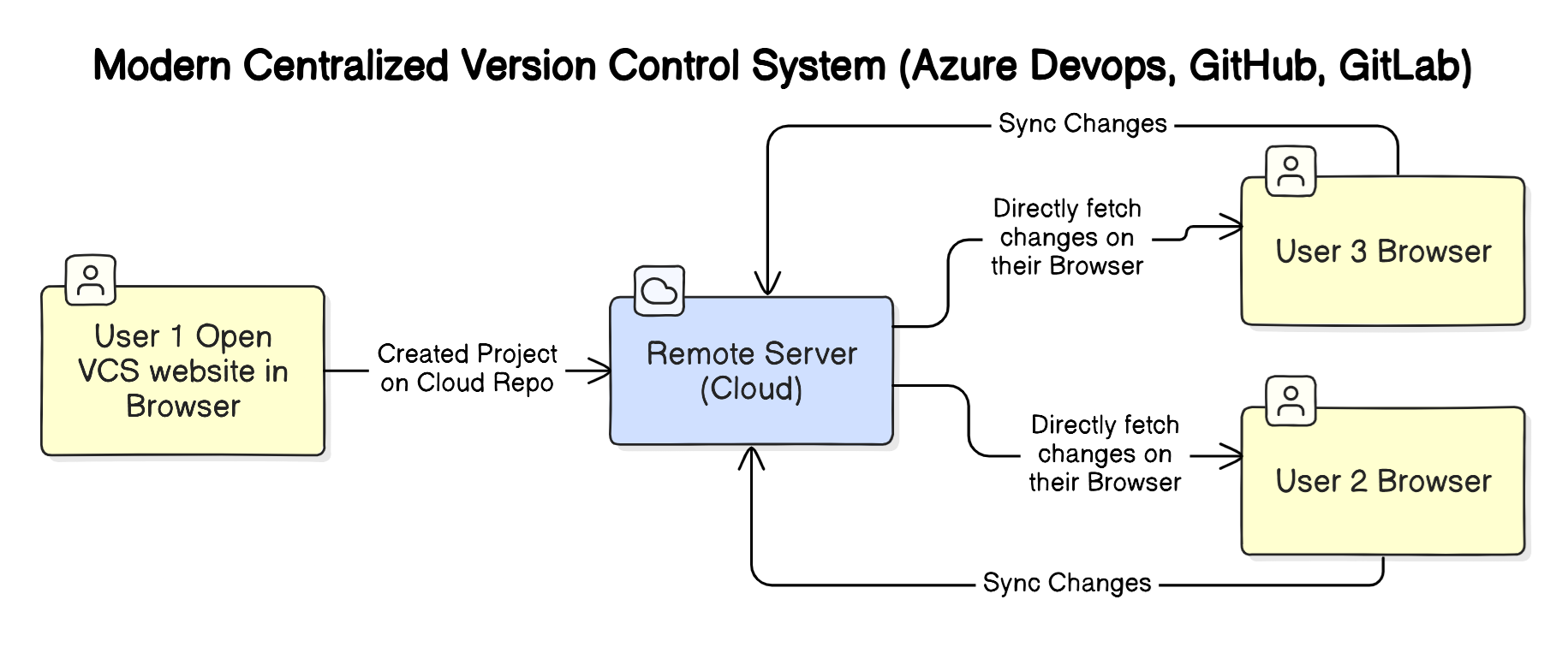
4. Modern Centralized Version Control Systems
- Platforms like GitHub, Bitbucket, and GitLab combine the benefits of both centralized and distributed systems.
- Cloud-based: No need for local installation; repositories are hosted online.
- Features:
- Built-in web-based IDEs
- Easy access to code from anywhere
- Collaboration tools (pull requests, code reviews)
Popular MCVCS platforms include:
-
GitHub
- Widely used for open-source and private projects
- Features: Actions (for CI/CD), Codespaces, Projects
-
GitLab
- Comprehensive DevOps platform
- Features: Built-in CI/CD, container registry, monitoring
-
Bitbucket
- Part of the Atlassian suite
- Features: Integration with Jira, Trello, and other Atlassian products
-
Perforce
- Specialized for large-scale and binary-heavy projects
- Popular in gaming and multimedia industries
By using these modern platforms, developers can:
- Access their projects from anywhere with an internet connection
- Collaborate more easily with team members around the world
- Integrate version control with other development and project management tools
- Automate testing and deployment processes
- Manage projects more efficiently with built-in tools
What is Git?
Git is a distributed version control system that allows multiple developers to work on a project simultaneously. It tracks changes in source code during software development, creating a detailed history of modifications.
Key features of Git include:
- Distributed development
- Branching and merging
- Speed and efficiency
- Data integrity
Understanding GitHub
GitHub is a web-based platform built around Git that provides additional features for collaboration and project management. It serves as a centralized location for storing and managing Git repositories.
Key features of GitHub include:
- Remote repository hosting
- Pull requests and code reviews
- Issue tracking
- Project management tools
- Web-based code editing
Working with Git and GitHub
Basic Git Workflow
- Initialize a repository
- Make changes to files
- Stage changes
- Commit changes
- Push to a remote repository (e.g., GitHub)
1. Install and Configure Git
- Install Git and configure it with your name and email:
git config --global user.name "Your Name" git config --global user.email "youremail@example.com"
2. Initialize a Repository
- Navigate to your project folder and initialize a Git repository:
git init
3. Move Files to Staging Area
- Add files to the staging area:
git add .
4. Commit Changes to Local Repository
- Commit the staged files:
git commit -m "Initial commit"
5. Push to Remote Repository (GitHub)
- Create a repository on GitHub.
- Link the remote GitHub repository to your local repository:
git remote add origin https://github.com/yourusername/your-repo.git - Push your changes:
git push -u origin master
Branching and Merging
Branching allows developers to work on different features or experiments without affecting the main codebase. Merging combines changes from different branches.
- Create a new branch
- Make changes and commit
- Switch back to the main branch
- Merge changes
Collaboration with GitHub
- Fork a repository
- Clone the forked repository
- Create a new branch
- Make changes and commit
- Push changes to your fork
- Create a pull request
Cheatsheet for Git

Conclusion
Git and GitHub have transformed the way developers collaborate on projects. By understanding these tools, you can streamline your development process, improve code quality, and contribute to open-source projects more effectively.
Song of the day
Here's song 🎵 of the day to freshen up your mood: