Remote Installation Service (RIS) in Windows Server GPO
3ʳᵈ Mar 2024
Enabling and Removing Remote Installation Service (RIS) in Windows Server GPO
Introduction
Remote Installation Services (RIS) was introduced with pre-SP2 versions of Windows Server 2003. It used the Preboot Execution Environment (PXE) to allow the automated installation of Windows Server 2003. However, in Windows Server 2003 SP2, RIS was replaced by Windows Deployment Services (WDS), which provided enhanced functionality and support for newer Windows versions.
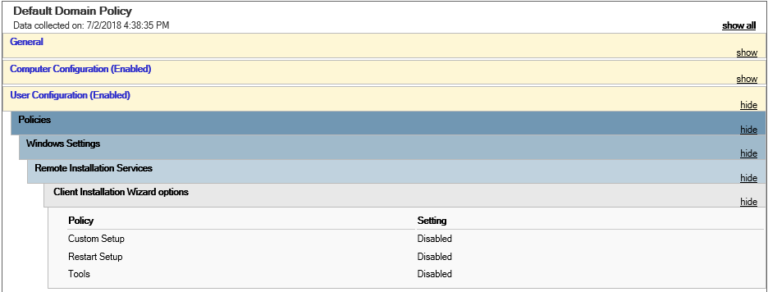
Although RIS has been deprecated, its GUID folder still exists in Windows Server, which is identified as:
{31B2F340-016D-11D2-945F-00C04FB984F9}
This folder is a part of the Default Domain Policy and may still contain remnants of RIS settings. If you need to remove or re-enable RIS settings, follow the steps below.
How to Remove or Enable Remote Installation Services (RIS) on Group Policy
To manually delete the RIS settings from the Group Policy:
- Navigate to the following directory on your PDC:
C:\Windows\SYSVOL\domain\Policies\{31B2F340-016D-11D2-945F-00C04FB984F9}\USER\Microsoft - Backup First: Before making any changes, create a backup of the Remote Installation folder by copying it to a safe location.
- Locate and delete the Remote Installation folder.
- Open the Group Policy Management Editor and refresh the GPO settings.
- Verify that the RIS settings are no longer present.
This action removes RIS configurations from the Default Domain Policy and ensures they are not applied to domain users.
How to Re-disable Remote Installation Services (RIS)
If you need to disable RIS settings again after enabling them by mistake, follow these steps:
- Retrieve the backup copy of the Remote Installation folder.
- Copy it back to the original location:
C:\Windows\SYSVOL\domain\Policies\{31B2F340-016D-11D2-945F-00C04FB984F9}\USER\Microsoft - Open Group Policy Management Editor and refresh the GPO settings.
- Run
gpupdate /forceon affected machines to apply the restored policy.
By restoring the backed-up folder, the previous RIS settings will be reinstated within Group Policy, ensuring that Remote Installation remains disabled.
References
For further guidance, check these helpful resources:
- Missing Remote Installation Services in GPO Editor
- Removing Remote Installation Services User Settings from the Default Domain Policy
- Delete 2003-Era Settings from 2012 Domain
- Group Policy Areas Missing
By following these steps, you can manage RIS-related settings effectively within Windows Server Group Policy.
Song of the day
Here's song 🎵 of the day to freshen up your mood: